Ask for help: file a support request
यह कंटेंट अभी तक आपकी भाषा में उपलब्ध नहीं है।
Use Support to ask one of your company’s help desks, such as IT or HR, for help. Each request gets a number, and you follow it and talk with the help desk on the request’s own page.
File a request
Section titled “File a request”-
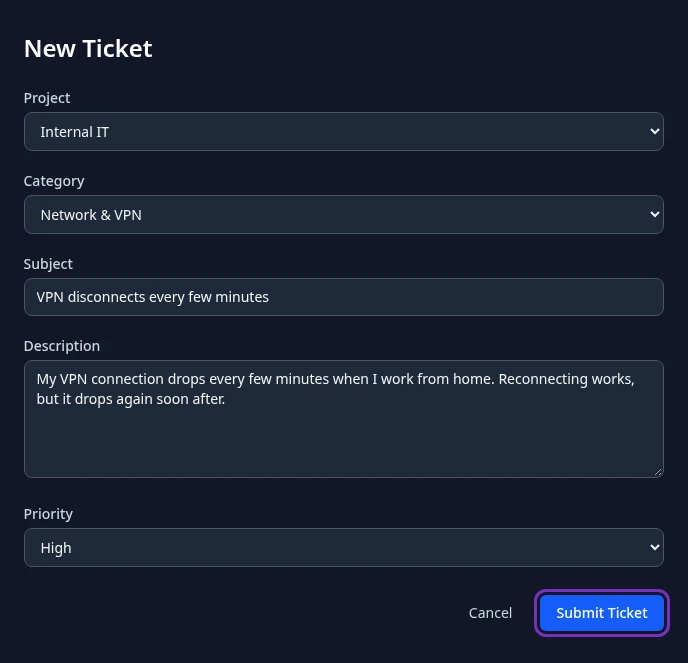
Select Support in the menu bar, then New Ticket.
-
In Project, choose the help desk your request is for.
The list shows the help desks that are open to every employee, and any help desk you’re a member of.
-
If the help desk uses categories, you can choose one in Category.
-
Enter a Subject of at least 3 characters: a short summary, such as “VPN disconnects every few minutes”.
-
In Description, explain what’s happening: what you see, since when, and what you’ve already tried. The description is optional and can be up to 5,000 characters.
-
Choose a Priority. Unless your company changed them, the choices are Low, Medium, High and Urgent, and Medium is selected to start with.
-
Select Submit Ticket.
Ticket created appears and your request opens on its own page, with a number such as TKT-0042. Its status is open, or in progress when the help desk assigns requests automatically.
Submit Ticket stays unavailable until the Subject has at least 3 characters. If the request can’t be sent, an error message appears and the form keeps what you typed, so you can try again.
What happens next
Section titled “What happens next”- The people who work on that help desk see your request in their list. When the help desk assigns requests automatically, someone gets yours right away.
- HR Admins and admins in admin mode can also open every request.
- Your managers (your own manager and the managers above them) can see the number and status of your requests, but only in help desks your admin has chosen for this, and never the subject, the description or the conversation. Help desks start with this turned off.
- Anima HR doesn’t send you an email or a notification when the help desk answers or changes the status. Check your request on the Support page. See Track your support requests.
- Each help desk numbers its requests separately, so two help desks can both have a TKT-0001. When you mention a request to someone, give the help desk too.
Can’t see this?
Section titled “Can’t see this?”- There’s no Support in your menu bar. The Support module is turned off for your company, or your roles don’t include it. Ask your admin.
- The Project list is empty. Your company hasn’t set up a help desk that you can send requests to. Ask your admin.
- The help desk you need isn’t in the list. Help desks for your company’s customers are only listed for the people who work on them. Ask your admin.