Set up the CRM
यह कंटेंट अभी तक आपकी भाषा में उपलब्ध नहीं है।
CRM settings hold your sales pipeline, the lists people pick from when they record deals and activities, and who gets new deals. Today the CRM screens use few of them: Automatic assignment is the one that changes what your sales team sees. The other settings are saved for features that don’t read them yet, and the tables below say so for each one.
Open CRM settings
Section titled “Open CRM settings”-
Turn on admin mode: select your name at the top right, then Elevate to Admin.
-
Select Settings in the menu bar, then the CRM card.
When you change anything, a bar with Unsaved changes appears at the bottom of the page. Select Save changes to apply them, or Discard. Reset to defaults puts the built-in settings back into the form; nothing changes until you save.
Assign new deals automatically
Section titled “Assign new deals automatically”By default a new deal belongs to the person who creates it. With automatic assignment, every new deal goes to the next person on a list instead.
-
Under Automatic assignment, turn on Assign new deals automatically.
-
Choose an Assignment method:
- Round robin: take turns in list order gives each new deal to the next person on the list.
- Fewest open deals first gives it to the person with the fewest open deals. On a tie, the person higher on the list gets it.
-
Under Add a person, search for each person by name and select them. They’re listed under Assign to.
-
Select Save changes.
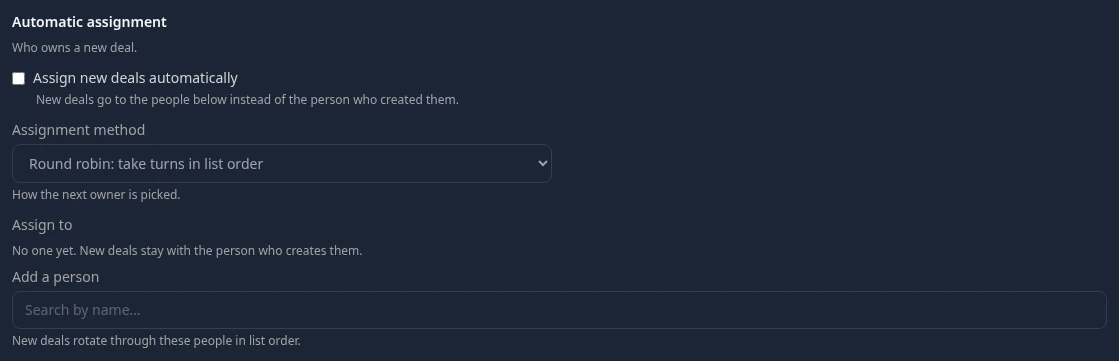
While Assign to is empty, new deals stay with the person who creates them, even with the switch on. Default: off.
Sales pipeline
Section titled “Sales pipeline”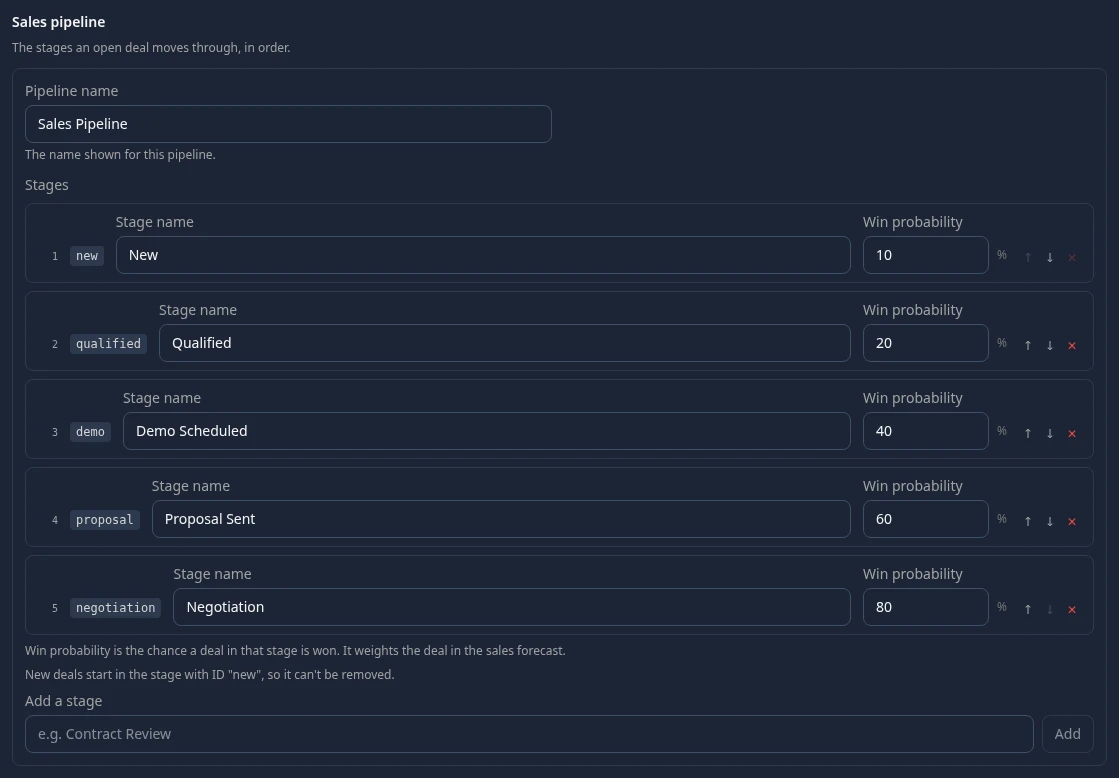
Every workspace starts with one pipeline, Sales Pipeline, with the stages New (10%), Qualified (20%), Demo Scheduled (40%), Proposal Sent (60%) and Negotiation (80%). Won and lost aren’t stages: a deal gets them when it’s closed. New deals start in New, so it can’t be removed, and an existing stage’s ID can’t change.
Other settings
Section titled “Other settings”| Setting | What it’s meant to do | Default | Works today? |
|---|---|---|---|
| Deal sources | Where a deal came from | Inbound, Outbound, Referral, Partner, Event, Website, Cold Call | No: the deal form doesn’t offer them |
| Loss reasons | Why a deal was lost | Budget, Timing, Competitor, No Decision, Feature Gap, Poor Fit | No: closing a deal as lost always records No Decision |
| Every deal needs a contact | Refuse a deal without a linked contact | Off | No |
| Activity types | The kinds of activity people log | Call, Email, Meeting, Task, Note, Demo | No |
| Call outcomes | How a call ended | connected, voicemail, no_answer, busy, wrong_number, left_message | No |
| Deal currencies and Default currency | Currencies for deal amounts | USD, EUR, GBP, BRL, INR; USD | No: amounts show in dollars |
| Stale after and Inactive after | Flag open deals with no stage change, or no activity, for this many days | 14 and 7 days | Only through the API: no screen lists flagged deals |
| Capture email in the CRM, Inbound address and Track replies | Give emails sent from the CRM a reply address, so replies are logged on the contact | Off | Only through the API: no screen sends CRM emails |
| Capture mode, Match emails to contacts, Match emails to deals, Notify the deal owner | How incoming emails are matched and announced | BCC; on; on; on | No |
Can’t see this?
Section titled “Can’t see this?”- There’s no CRM card. The CRM module is off: it’s in the Disabled group at the bottom of Settings. See Turn modules on and off.
- Save fails. Saving needs Manage settings in the CRM permissions. Only Admins in admin mode hold it by default: the HR Admin and Sales roles don’t. See Use the built-in roles.